Discover a challenge
Students explore an engaging project designed to spark curiosity, ask questions, and turn ideas into action.
The Lab makes learning to code exciting for ages 11–14—with hands-on projects, a real coding Playground, and growth-mindset moments that help kids keep going when things get hard.
Help your child go from using technology to understanding how to build with it. The Lab combines fun, relevant coding challenges with encouragement to experiment, solve problems, and find their voice.
Interested in the subscription box? Ask about availability and upcoming options.
Try it, change it, and watch an idea come to life.
Learn to reframe mistakes as clues, not stop signs.
The Lab brings together hands-on challenges, a creative coding experience, and reflection that makes every milestone meaningful.
Students explore an engaging project designed to spark curiosity, ask questions, and turn ideas into action.
They experiment with code, solve problems, and bring something of their own to life through guided building.
Students reflect on setbacks, celebrate progress, and practice the confidence to try again.
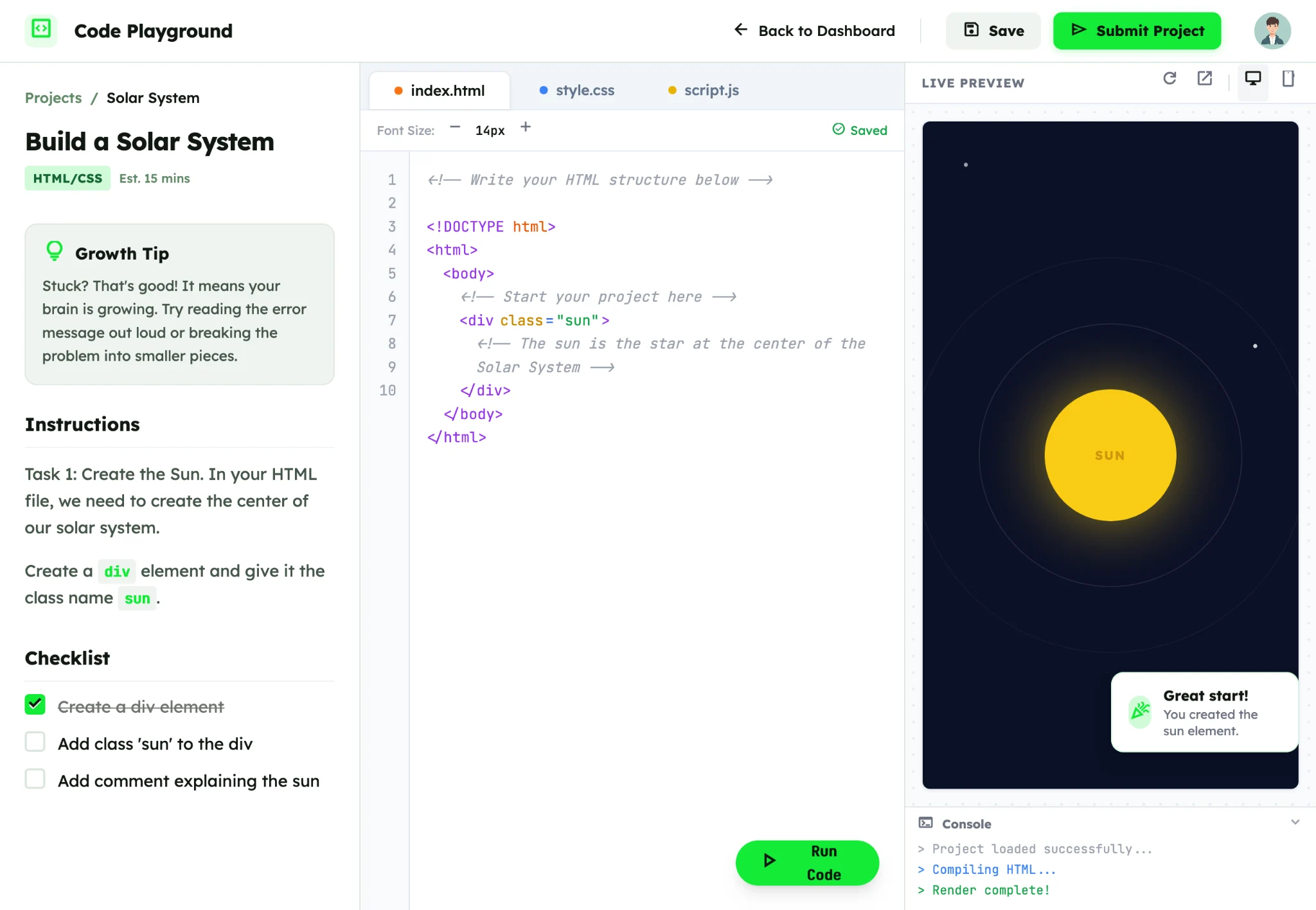
Students can follow guided instructions, write real code, and see what they create in the live preview. Here's a real look at our Solar System project.
Clear instructions and a checklist give learners a starting point.
Switch between HTML, CSS, and JavaScript.
A live preview connects code to creative results.
Relevant, creative projects help students connect technical skills to their interests and everyday lives.
Learn how HTML elements and CSS work together while creating a space-inspired project. See the actual learning experience above.
Practice sequencing, logic, and iteration through an exciting launch challenge.
Explore creative expression while learning how interactive programs work.
Build a space to share your interests, goals, and unique point of view.
Turn familiar games into original coding and design challenges.
One small word can change how students see a challenge.
The Lab intentionally pairs technical exploration with opportunities to practice self-awareness, resilience, and thoughtful decision-making.
Normalize learning through experimentation and mistakes.
Replace “I can't” with the more useful question, “What can I try next?”
Integrate reflection activities connected to CASEL's five core competency areas.
Use The Lab for classroom enrichment, after-school programs, or STEM clubs. Explore an illustrative activity plan, then talk with us about what fits your learners.
Choose your learning environment and focus. We'll show a sample way to use The Lab.
Where will students learn?What's your priority?Use a student-built web page to introduce HTML and CSS, with room for personal expression and iteration.
Explore a district partnership built around program fit, implementation conversations, and shared student goals.
Whether you’re a parent or an educator, there's room to explore The Lab together.
The Lab is designed with parents and middle school learners in mind. Reach out to learn more about the home subscription box and its availability.
The Lab is designed primarily for middle school students, approximately ages 11–14.
No prior coding experience is assumed for introductory projects. Project difficulty may vary, giving learners room to grow.
The Lab pairs coding projects with reflection and growth mindset prompts designed to connect with CASEL's five core SEL competencies. This is a curricular design alignment, not an endorsement or certification by CASEL.
Yes. The Lab is being designed for flexible use in classrooms, clubs, and after-school enrichment. The specific format and support can be discussed for your program.
Choose “Start a conversation” to prepare an email with your school and program information. This prototype uses your email application, rather than a connected lead-capture backend.